

Having a website is all about getting visibility and reaching your target audience. Search Engine Optimisation is an important tool for website owners to expand their orgaOptimisationd avoid spending too much on paid online marketing.
In today's post, we discuss sitemaps, a fundamental element of your website that helps search engines navigate and index your website.
We will explore the different types of sitemaps and their utility in Search Engine Optimisation and also touch upon certain dos and don'ts for creating the ideal sitemaps.
Table of Contents |

What is a Sitemap?
A sitemap file provides search engines with information about the pages, videos, documents, and other files on your website, and how these elements relate to each other. Search engine crawlers use this information to crawl websites in a systematic manner and regularly index the most significant parts of your website.
Having a sitemap is especially important if your website has a large number of pages, or isolated pages which are not well linked internally.
The Origin of Sitemaps: When Were They Introduced and Why?
Sitemaps as we know them today, especially in XML format, were officially introduced by Google in June 2005. The purpose behind this innovation was simple yet powerful: to give webmasters a direct way to inform search engines about the pages on their websites that should be crawled and indexed.
Before sitemaps, search engines relied almost entirely on crawling through internal links to discover new pages. This approach often missed deep-linked pages, newly launched websites, or dynamically generated content. Google’s introduction of the XML Sitemap Protocol was a game-changer, allowing site owners to proactively provide a roadmap of their site’s structure.
Soon after, Yahoo and Microsoft (Bing) adopted the protocol as well, and by 2006, all three collaborated to create a standardized version: the Sitemaps Protocol 0.9. This protocol remains the foundation for modern sitemaps.
Why Were Sitemaps Introduced?
- To improve search engine efficiency in discovering new and updated content.
- To allow website owners to highlight important pages and media types (like videos or images).
- To support larger or more complex websites where traditional crawling might not surface all content.
- To reduce indexing delays for newly published or time-sensitive content.
Over time, the sitemap concept expanded to include various types like image sitemaps, video sitemaps, and news sitemaps, making them a vital component of technical SEO and site visibility.
In short: sitemaps were introduced not just to support search engines but to empower website owners to take control of how their content is discovered.
Types of Sitemaps
There are two main types of sitemaps, XML sitemaps and HTML sitemaps. Each type serves a unique purpose and offers different SEO benefits for your website.
XML Sitemap
An XML sitemap is designed for search engine crawlers. It provides the search engine with a structured list of all pages on your website, to allow quick and effective indexing. Having an XML sitemap is highly recommended for new websites, websites with dynamic content, and for websites that have pages that are not easily discoverable through internal links.
Features of XML Sitemaps:
Listing URLs to make it easier for search engines to find all your content.
Including metadata such as publishing date, last modified date, frequency of updates, and page priority relative to the homepage on the site.
The anatomy of XML Sitemap:
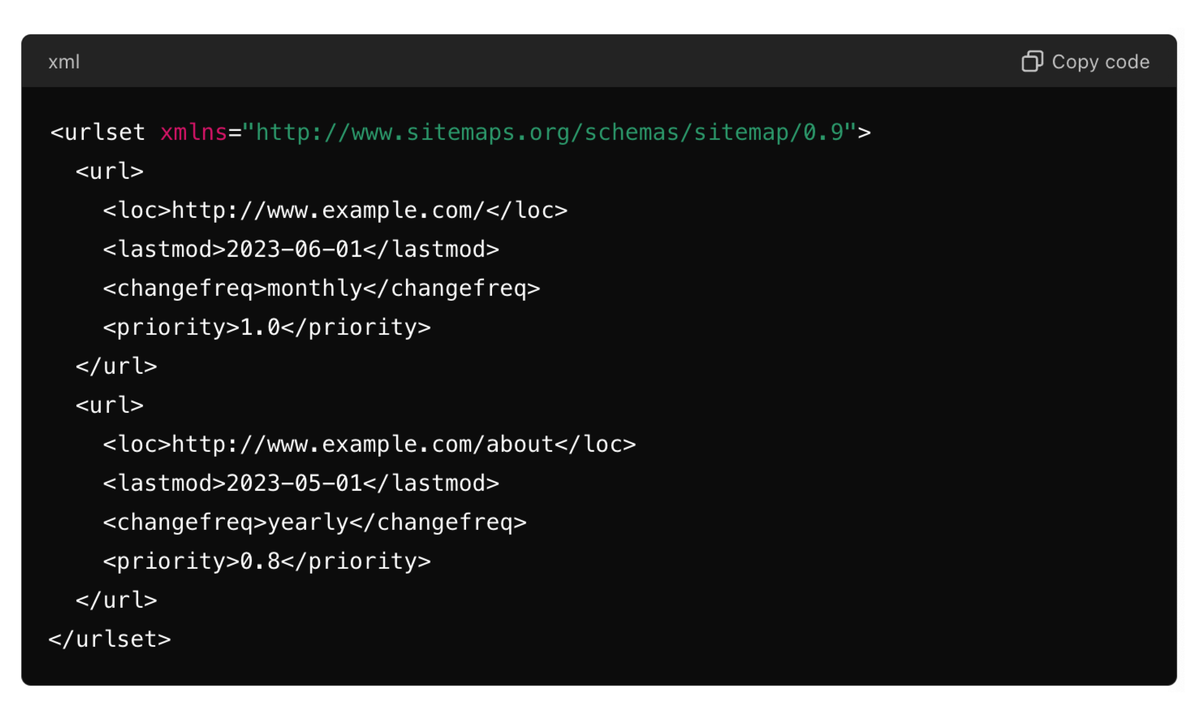
An XML sitemap is a file that helps search engines understand the structure of your website and find all the important pages. Herurlsetbasic sample code for an XML sitemap:
HTML Sitemap
The HTML sitemap is a user-facing sitemap. It provides a user-friendly overview of the website structure and helps users quickly reach the content they seek.
While not directly impacting search optimization, HTML sitemaps do help in SEO by improving the User Experience (UX).
Features of HTML Sitemaps:
Acts as a navigational tool for the users
Improves the User Experience, which is fast becoming a key SEO parameter that defines user stickiness and reduces bounce rates.
The anatomy of HTML Sitemap:
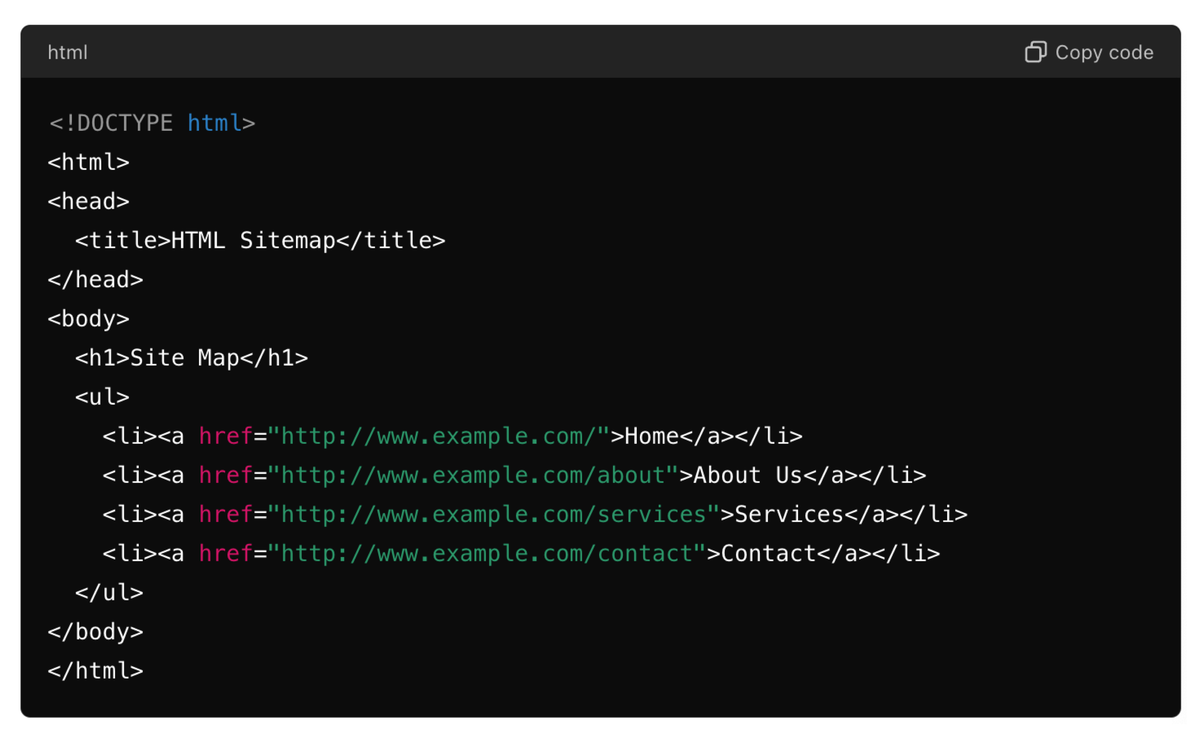
An HTML sitemap is designed for users to navigate your site easily. It’s also crawlable by search engines, which helps improve your SEO. Here's a basic HTML sitemap example:
Website Sitemap
Other Sitemap Format
Image Sitemaps
Help search engines discover and index images hosted on your site, especially useful for image-heavy sites or portfolios.
Video Sitemaps
Used when embedding or hosting video content, allowing Google to better index and show your videos in search results.
News Sitemaps
Tailored for websites publishing time-sensitive content (like news portals), these help Google News index fresh articles quickly.
Sitemap Index
A Sitemap Index File is a special type of XML file that acts as a directory for multiple individual sitemaps. It’s especially useful for large websites with thousands (or millions) of pages, where a single sitemap might not be enough due to file size or URL limits.
Sitemap Types Comparison Table
|
|
|
|
|
|
|
|
|
|
|
|
|
|
|
|
|
|
|
|
|
|
|
|
|
|
|
|
|
|
|
|
|
|
|
|
|
|
|
|
|
|
Importance of Sitemaps in SEO
Search engines like Google, Bing, DuckDuckGo, etc. use sitemaps to find and index website pages. There are three elements that cover the entire process:
- Discovery: Search engine crawlers use sitemaps to identify all pages on your website, including pages which are dynamically generated and may not be well linked within the site structure. Thus, sitemaps ensure that all your content is discovered by the search engines.
- Crawling: Sitemaps also help search engines in crawling the website more effectively, according to the assigned priority of the pages. This ensures that the most important pages on your website are crawled and indexed to be shown in the search results.
- Indexing: It is the process of filing away the URLs by search engines to be displayed in search results. Sitemaps provide important parameters like the date of publication or the last modified date to indicate the freshness and relevance of the content, which can be a ranking factor as well.
Next up, let's learn how to create a sitemap.
How to Create XML Sitemaps?
Creating an XML sitemap doesn't have to be complicated. Here’s a simple step-by-step process:
Use an Online Sitemap Generator:
Tools like XML-sitemaps.com let you generate sitemaps by just entering your website URL.
Use CMS Plugins:
If your site runs on WordPress, install plugins like Yoast SEO or Rank Math, which automatically generate and update your XML sitemap.
Manual Coding:
For smaller websites or developers, you can manually create an XML file using proper tags like
Crawl-Based SEO Tools:
Tools like Screaming Frog, Ahrefs, and SEMrush allow you to crawl your site and export a sitemap file directly.
Upload and Submit:
Once created, upload the sitemap.xml file to your root directory and submit it in Google Search Console under the “Sitemaps” section.
Tools for Creating XML Sitemaps
Creating an XML sitemap manually can be time-consuming, especially for large websites. Fortunately, several tools and generators can make the process much easier:
1. Screaming Frog SEO Spider:
A desktop program that can crawl your website and export an XML sitemap based on your settings. Ideal for SEO professionals and large websites.
2. Yoast SEO (for WordPress):
This popular WordPress plugin automatically generates an XML sitemap for your website and keeps it updated whenever new content is added.
3. Google XML Sitemaps Plugin:
Another excellent plugin for WordPress sites. It supports custom URLs, prioritization, and automatic updates.
4. XML-sitemaps.com:
A free and easy-to-use online tool. Enter your website URL, and it generates a downloadable sitemap within seconds. Paid versions support larger websites.
5. Ahrefs Webmaster Tools:
While mainly known for backlink analysis, Ahrefs also offers a site audit tool that can help identify sitemap issues and generate clean sitemaps.
6. SEMrush Site Audit:
Useful for technical SEO audits, SEMrush also gives sitemap suggestions and helps identify missing or duplicate entries.
Moreover, if you have a custom website made using PHP, Python, or any other scripting language, creating a custom script to generate a sitemap can offer more control and customisation.
Best practices for creating XML Sitemaps
Here are some things to keep in mind when generating XML sitemaps:
1. Include Important Pages:
Focus on including pages that are valuable to both users and search engines. These typically include your homepage, major category pages, blog posts, and important product pages.
2. Keep it Updated:
Regularly update your sitemap to reflect new content, changes, or removed pages. Tools and plugins can help automate this process.
3. Avoid Duplicate Content:
Ensure your sitemap does not include duplicate content or pages with similar content. This can confuse search engines and dilute the value of your primary pages.
4. Use Metadata:
Include metadata in your XML sitemap to provide additional information about each URL. Metadata elements such as, and help search engines understand the importance and frequency of updates to your pages.
5. Limit the Number of URLs:
Sitemaps are limited to 50,000 URLs or 50MB in size. If your site exceeds these limits, create multiple sitemaps and use a sitemap index file to reference them.
How to submit an XML sitemap?
Once your sitemap is created, the next step is to submit it to search engines. Here’s how to do it for the major search engines:
1. Google Search Console:
- Log in to Google Search Console: Go to the Search Console dashboard for your website.
- Navigate to the Sitemaps Section: On the left-hand sidebar, click on "Sitemaps."
- Submit Your Sitemap: Enter the URL of your sitemap (e.g., https://www.example.com/sitemap.xml) in the "Add a new sitemap" field and click "Submit."
2. Bing Webmaster Tools:
- Log in to Bing Webmaster Tools: Access your website's dashboard.
- Navigate to the Sitemaps Section: On the sidebar, click on "Sitemaps."
- Submit Your Sitemap: Enter the URL of your sitemap and click "Submit."
3. Other Search Engines:
- For other search engines like Yahoo and DuckDuckGo, submitting your sitemap to Google and Bing is typically sufficient, as these engines often use similar indexing methods. However, you can also directly submit sitemaps via their webmaster tools if available.
Ensuring Successful Submission
After submitting your sitemap, it’s important to monitor its status to ensure it’s successfully processed:
1. Check Submission Status:
- Both Google Search Console and Bing Webmaster Tools provide detailed reports on your sitemap’s status. Check for errors or warnings and address any issues.
2. Monitor Indexing:
- Regularly review your indexing status in search console tools. Look for any pages that are not indexed and investigate potential issues.
3. Update and Resubmit as Needed:
- Whenever you make significant changes to your site structure or content, update your sitemap and resubmit it to the search engines.
What Are Sitemaps Used For?
Sitemaps serve as a bridge between your website and search engines. They are primarily used to:
Help Search Engines Crawl Content Efficiently
By listing all important URLs in a structured format, sitemaps ensure that search engines don’t miss key pages—even if they are buried deep or not linked properly.
Improve Indexing of New or Updated Content
Sitemaps provide metadata like last modified date (
Highlight Media Content
Through specialized sitemaps (image, video, news), websites can alert search engines to rich media content that may not be as easily discoverable.
Support Large or Complex Websites
For websites with thousands of pages, e-commerce platforms, or multilingual sites, sitemaps help manage indexing efficiently via sitemap index files.
Identify Crawl Errors in Google Search Console
When you submit a sitemap to Google Search Console, you get visibility into crawl issues, indexed page count, and other important diagnostics.
In short: sitemaps improve visibility, crawlability, and search performance making them a crucial part of any SEO strategy.
What about HTML Sitemaps?
As mentioned earlier, HTML sitemaps are a part of your website's user experience. Since an HTML sitemap is a regular page on your website, typically linked at www.example.com/sitemap.html, it can be created and modified by the developer.
HTML sitemap does not require any submission to the search engines.
Benefits of HTML Sitemaps:
Improve user experience by providing a quick overview of your website.
Help users (and crawlers) access deeper or hidden pages.
Useful for accessibility and usability, especially on larger sites.
While not as critical as XML sitemaps for SEO, HTML sitemaps are still a smart addition, especially if you value navigation and user-friendly design.
Also Read: The Crucial Role of Technical SEO
Advantages of sitemaps:
There are many benefits of sitemaps both for search engines and website owners. This allows you to get all the critical pages of your site found by search engine crawlers, including the ones that are alone or have little links pointing to them. They make crawling more efficient as search engines can deal with large websites & websites that get updated frequently. They also give metadata for every URL, including the last modification date, update frequency, priority, etc., enabling search engines to prioritize indexing more important pages. This will help in ensuring better visibility, better user experience, and ultimately better overall performance on SEO.
Tips for Optimizing Sitemaps
- Target Important Pages: Target only important and high-value pages for you, such as the homepage, product pages, and your blog. Do not fill your sitemap with unrelated URLs or similar content.
- Update Regularly: Keep your sitemap current. Search engines need the most up-to-date information whenever new content is added or removed from your site,
- Enhance meta: Feed in meta, like the last modification and update frequency, so search engines can easily find your content preferences.
- Restrict URL Paste: An XML sitemap should not exceed 50,000 URLs or 50MB in size. If you have a bigger website, create several sitemaps and a sitemap index file.
- Validate Your Sitemap: Use your favorite tool, such as Google Search Console, to verify that your sitemap is error-free and adequately indexed.
Concluding thoughts
Understanding the importance of sitemaps and integrating them into your SEO strategy can lead to better search engine rankings, increased organic traffic, and a more user-friendly website. Take action today by creating or updating your sitemap, and watch how this simple yet powerful tool can make a significant impact on your SEO success.
If you are looking for expert guidance on SEO and digital marketing, speak to an expert at DO Communication now.
FAQs: Common Question About Sitemaps
Q1. Can a sitemap improve website rankings?
Ans: Sitemaps are vital in SERP as per se they do not directly affect rankings, but they make sure that search engines will have the chance to discover and index all your key pages on your site.
Q2. Should a sitemap be updated regularly?
Ans: Always update your sitemap if any content has been added, modified, or deleted. This helps search engines to be up to date with your website hierarchy and content.
Q3. Where should I place a sitemap on my website?
Ans: Place your sitemap in the root folder of your domain (example: https://www.example.com/sitemap.xml) This guarantees that it is accessible to search engine crawlers with ease.
Q4. How do I submit a sitemap to search engines?
Ans: Use submission tools like Google Search Console or Bing Webmaster Tools to submit your sitemap. All you have to do is paste your sitemap url in the sitemap submission tab of that tool and check its status for any errors.
Q5. Do all websites need a sitemap?
Ans: A sitemap is not necessary for every site, but it is very helpful when dealing with larger, dynamic, or lower-linked sites. Sitemaps play an important role in order to find all the important content and index them efficiently.
Q6. What is the difference between XML and HTML sitemaps?
Ans: An XML sitemap is created primarily for search engines to help them crawl and index your site more efficiently. It's machine-readable and includes metadata about your pages. An HTML sitemap, on the other hand, is designed for human visitors. It provides a navigable list of pages to improve user experience and internal linking.
Q7. Do I need both an XML and an HTML sitemap?
Ans: While it's not mandatory, having both is beneficial. XML sitemaps help search engines index your content, while HTML sitemaps enhance usability for visitors and can slightly support SEO by strengthening internal linking.
Q8. How often should I update my sitemap?
You should update your sitemap whenever new content is added, existing content is modified, or deleted. If you're using a CMS like WordPress, plugins like Yoast or Rank Math will handle updates automatically.
Q9. Can I include noindex or canonical pages in the sitemap?
Ans: No. Avoid including noindex, canonical, or blocked-by-robots.txt pages in your sitemap. Your sitemap should only contain indexable and valuable URLs that you want search engines to crawl and rank.
Q10. Is there a limit to how many URLs I can include in a sitemap?
Ans: Yes. A single XML sitemap can include up to 50,000 URLs or be 50MB in size (uncompressed). If your site exceeds this, use a sitemap index file to organize multiple sitemap files.
Q11. How can I check if my sitemap is working?
Ans: You can test your sitemap in Google Search Console under the “Sitemaps” section. It will show you the number of URLs submitted, indexed, and any errors or warnings found during crawling.
Q12. Do image and video sitemaps help SEO?
Ans: Yes! Submitting image and video sitemaps can improve visibility in Google Image and Video search results. It ensures that search engines discover media content that might otherwise be missed.
